Agent开发——一些拓展功能

做了一些简单的拓展功能:游戏监听、时间监听、联网搜索、Live2d动作联动

前言

一问一答的对话还是过于枯燥了,不如做一些在用户层面上的主动对话吧(其实本质上还是一问一答,只是用户看不到了)

游戏监听

首先明确需求,我们要做的是用户在启动游戏时,AI能够主动挑起话题。

首先,如何发现启动游戏?

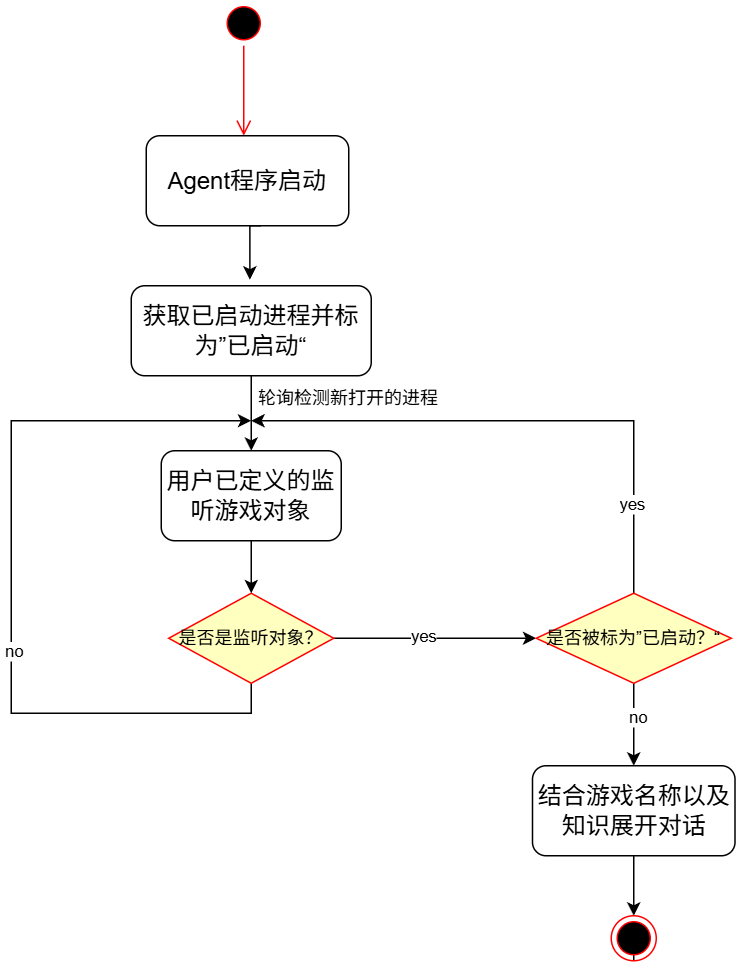
游戏进程监听

遍历当前用户电脑上的所有运行着的进程,将其放入”initial_pids”即已启动的进程,以免我们的Agent启动后面临大量待处理的游戏进程监听结果。

随后,用户需要维护一个游戏信息的list,当检测到list中的进程启动后则触发对话

流程图如下
img1

需要监听的游戏

目前还是需要手动写入的

如何获取对应进程的名称?
打开任务管理器,点击”详细信息“即可看到运行在电脑上的所有进程啦

1
process_names: [["cloudmusic.exe","网易云音乐"], ["steam.exe","steam平台"],["BsgLauncher.exe","逃离塔科夫"],["bf6.exe","战地风云6"],["SlayTheSpire2.exe","杀戮尖塔2"]]

实现

监听文件

1
2
3
4
5
6
7
8
9
10
11
12
13
14
15
16
17
18
19
20
21
22
23
24
25
26
27
28
29
30
31
32
33
34
35
36
37
38
import psutil
import time
from PySide6.QtCore import Signal, QObject
import llm
from config import config
import re

def listen_game():
# 从配置获取游戏参数
game_config = config.get("game", {})
game_process_names = game_config.get("process_names")
check_interval = game_config.get("check_interval", 2)

# 记录应用启动时的所有进程ID
initial_pids = set(psutil.pids())

while True:
for process_name in game_process_names:
# 获取当前所有匹配的进程ID
current_pids = []
for proc in psutil.process_iter(['pid', 'name']):
try:
if proc.info['name'].lower() == process_name[0].lower():
current_pids.append(proc.info['pid'])
except (psutil.NoSuchProcess, psutil.AccessDenied, psutil.ZombieProcess):
continue

# 检查是否有新启动的进程(PID不在初始列表中)
new_pids = [pid for pid in current_pids if pid not in initial_pids]
key = process_name[0].lower()
if new_pids and not detected_games.get(key, False):
print(f"检测到新游戏 {process_name[1]} 已打开,开始AI主动对话。")
# AI主动对话逻辑
game_info = f"检测到程序 {process_name[1]} 已打开,开始AI主动对话。"
response = llm.chat(game_info)
elif not current_pids:
detected_games[key] = False
time.sleep(check_interval)

main主进程中启动监听线程:

1
2
3
4
5
6
7
self.start_game_listener()

def start_game_listener(self):
"""启动游戏监听线程"""
listener_thread = threading.Thread(target=game_listening.listen_game,daemon=True)
listener_thread.start()
print('[INFO] 游戏监听线程已启动')

时间监听

和上面的游戏监听的原理一致,也是主动对话的一坏

当时间来到特定节日或者当天的特定时间时,即可触发主动对话。

具体实现

为了当天的特殊日期不会重复,不得不开一个txt记录当天是否已经播报过了(while Ture下的涉及LLM调用的东西写起来一定要小心)

1
2
3
4
5
6
7
8
9
10
11
12
13
14
15
16
17
18
19
20
21
22
23
24
25
26
27
28
29
30
31
32
33
34
35
36
37
38
39
40
41
42
43
44
45
46
47
48
49
50
51
52
53
54
55
56
57
58
59
60
61
62
63
64
65
66
67
68
69
70
import time
from PySide6.QtCore import Signal, QObject
import llm
from config import config
import re
import os

class TimeSignal(QObject):
time_detected = Signal(str, str, str, bool) # 用于传递时间检测信息

time_signal = TimeSignal()

listening_date = [[1,1],[2,14],[4,1],[5,1],[6,1],[7,1],[8,1],[9,1],[10,1],[12,27]]
listening_time=[0,8,12,14,17,20,22]

localtime = time.localtime(time.time())

# 节日播报记录文件
HOLIDAY_RECORD_FILE = "holiday_broadcasted.txt"

def get_current_date_str():
"""获取当前日期字符串,格式为YYYY-MM-DD"""
return time.strftime("%Y-%m-%d", localtime)

def has_broadcasted_today():
"""检查今天是否已经播报过节日"""
if not os.path.exists(HOLIDAY_RECORD_FILE):
return False
try:
with open(HOLIDAY_RECORD_FILE, "r", encoding="utf-8") as f:
last_broadcast_date = f.read().strip()
return last_broadcast_date == get_current_date_str()
except:
return False

def record_broadcast():
"""记录今天的播报"""
with open(HOLIDAY_RECORD_FILE, "w", encoding="utf-8") as f:
f.write(get_current_date_str())

def listen_time():
while True:
localtime = time.localtime(time.time())
#特殊节日播报
for date in listening_date:
if date[0]==localtime.tm_mon and date[1]==localtime.tm_mday:
if not has_broadcasted_today():
print("今天是"+str(date[0])+"月"+str(date[1])+"日,触发特殊节日播报")
response = llm.chat("今天是"+str(date[0])+"月"+str(date[1])+"日,开始AI主动对话")
pattern = r'【[^】]*】'
pure_text = re.sub(pattern, '', response)
if pure_text != response:
expression = response.split("【")[1][:2]
print("表情" + expression)
record_broadcast()
print("节日播报完成,已记录今天不再重复播报")
break

#特殊时间播报
for cur_time in listening_time:
if cur_time == localtime.tm_hour and localtime.tm_min==0: #仅准点触发
print("现在是"+str(cur_time)+",触发主动报时")
response = llm.chat("现在是"+str(cur_time)+"点,和Master主动打个招呼吧")
pattern = r'【[^】]*】'
pure_text = re.sub(pattern, '', response)
if pure_text != response:
expression = response.split("【")[1][:2]
print("表情" + expression)
print("时间播报完成,已记录今天不再重复播报")
time.sleep(90)

联网搜索

简单的Tool

Tool的书写

使用的是langchain自带的duckduckgo的搜索

1
2
3
4
5
6
7
@tool(description="联网搜索")
def online_search_tool(input:str):
from langchain_community.tools import DuckDuckGoSearchResults
search = DuckDuckGoSearchResults()
result = search.invoke(input)
print("搜索结果:"+result)
return result

搜索结果如下:

1
2
3
4
5
搜索结果:
snippet: 有国际媒体认为,美以伊战事进入到"新阶段",冲突长期化风险有增无减,美国正越来越接近"下一个战争泥潭"。1.目前战况如何 伊方统计显示,美以行动已致伊朗1300多名平民丧生。 美媒披露,至少13名美军人员死亡、约200人受伤,而实际伤亡人数或更高。, title: 6问美以伊战事走向_伊朗_美国_停战 - 搜狐, link: https://www.sohu.com/a/996928481_121455647,
snippet: 新华社巴格达3月15日电 题:六问美以伊战事走向 新华社记者李军 美国和以色列对伊朗军事行动已进入第三周。伊朗伊斯兰革命卫队15日确认发起第53 ..., title: 国际观察|六问美以伊战事走向_腾讯新闻, link: https://news.qq.com/rain/a/20260315A06VNX00?adChannelId=news,
snippet: 伊方统计显示,美以行 动已致伊朗1300多名平民丧生。 美媒披露,至少13名美军人员死亡、约200人受伤,而实际伤亡人数或更高。 美国方面13日称,伊方逾1.5万个目标遭打击、导弹数量"减少90%"。 伊朗称,已摧毁70%的美军中东基地、近10部雷达。, title: 国际观察|六问美以伊战事走向-我的钢铁网, link: https://news.mysteel.com/a/26031609/9402AADDA5F6825A.html,
snippet: 美伊開戰 美國與以色列2026年2月28日聯手轟炸伊朗首都德黑蘭在內多個地區後,伊朗伊斯蘭革命衛隊宣稱對中東 地區美軍基地發動攻擊,報復美以空襲。, title: 美伊開戰 | 新聞專題 | 中央社 Cna, link: https://www.cna.com.tw/topic/newstopic/4469.aspx

prompt

1
2
3
4
5
online_search_tool
- 核心能力:入参为你不明白的词汇,句子。从网络中去搜索相关的知识以满足对话需求
- 出参:搜索的结果
- 使用场景:当与用户的对话涉及到了你不明白的词汇、知识,或者用户在问一些实时性的新闻、知识时,你若发现自己无法根据现有知识解答用户的问题,即可调用该工具联网搜索相关知识以回答用户
- 示例:用户问”你看最近美国对伊朗军事行动的新闻了吗“,你发现这是最新的新闻,你并不了解,需要调用此工具联网搜索相关信息以与用户继续对话

Live2d动作联动

我这里使用的是Live2dViewerEX来进行Live2d形象的呈现,使用ExAPI进行信号传输

我之前的Blog有相关的介绍:使用ExAPI让Live2D接入多智能体

这里以公模 桃濑日和 为例:
模型目录下有hiyori_m01.motion3.json到hiyori_m08.motion3.json的8个动作文件,在简单看了一遍之后将8个动作分为三类,开心、伤心(失望)、惊喜。接下来要做的事情就很简单了。
写一个Tool来让Agent控制动作即可

Tool书写

目前的写法比较粗浅

1
2
3
4
5
6
7
8
9
10
11
12
13
14
@tool(description="根据对话展示心情")
def get_motion_tool(emotion:str):
global motion_id
print("当前心情:"+emotion)
if emotion=="happy":
list1 = [1,2,3,5]
motion_id = random.choice(list1)
elif emotion =="sad":
list1 = [4,7,8]
motion_id = random.choice(list1)
elif emotion == "surprised":
list1 = [6]
motion_id = random.choice(list1)
return emotion

prompt

1
2
3
4
get_motion_tool
- 核心能力:入参为你理解针对用户对话你应该的心情,共“happy”,"sad","surprised"三项可选,happy为默认项,sad同时可以表达失望、难过、苦恼等心情。注意,要传入的是你的心情!!!
- 出参:无
- 使用场景:用户的每一次对话都要调用此工具来判断对话情景下neuro应该展现的心情。注意,这个工具仅仅是判断心情用,与接下来你对对话的回复没有关系

调用

llm对话结束后,调用动作发送给Live2d模型

1
2
3
4
# Live2d三连
live2d_api.send_json_message(res)
live2d_api.send_sound()
live2d_api.send_motion(tools.tools.motion_id)

直接粗暴写成本地动作文件路径了,日后再改吧

1
2
3
4
5
6
7
8
9
10
11
12
13
14
15
16
17
18
19
20
def send_motion(id:int):
ws_uri = config.get("live2d.websocket_uri", "ws://127.0.0.1:10086/api")

data = {
"msg": 13200,
"msgId": 1,
"data": {
"id": 0,
"type": 1,
"mtn": "C:\\Users\\X.J\\Desktop\\hiyori-main\\hiyori_m0"+str(id)+".motion3.json"
}
}

try:
from websocket import create_connection # 延迟导入
ws = create_connection(ws_uri)
ws.send(json.dumps(data))
print("live2d动作发送成功")
except Exception as e:
print("Live2D动作发送错误:", str(e))