Next8.2.0以上版本部署Valine

由于Next在8.2.0以上版本不再内置Valine,因此需要更加繁琐的手动配置,如需使用尽可能使用更低版本的Next

前言

由于最开始搭建Blog的时候没有想太多,全都是按照流程来,导致下载了更高版本的Next还对照着低版本的教程去部署Valine,浪费了大量的时间。所以如果需要部署Valine,提前就要知道使用更低版本的Next(这对初学者也不大可能吧)。

安装Next-Valine补丁(针对8.2.0以上版本的Next)

Github讨论贴: Why remove the valine comment in the latest version?
Hexo NexT Valine补丁: hexo-next-valine

如果不想追根溯源看看Next官方砍掉内置Valine的脑残(并非)举措,
省流:在项目根目录终端运行如下代码:

1
npm install next-theme/hexo-next-valine

正常的配置流程

1 注册 LeanCloud

2 创建 Valine 应用,名称任意,例如 Valine-Admin

3 进入对应的应用,点击 设置 -> 应用 Keys,获取 AppID 和 AppKey
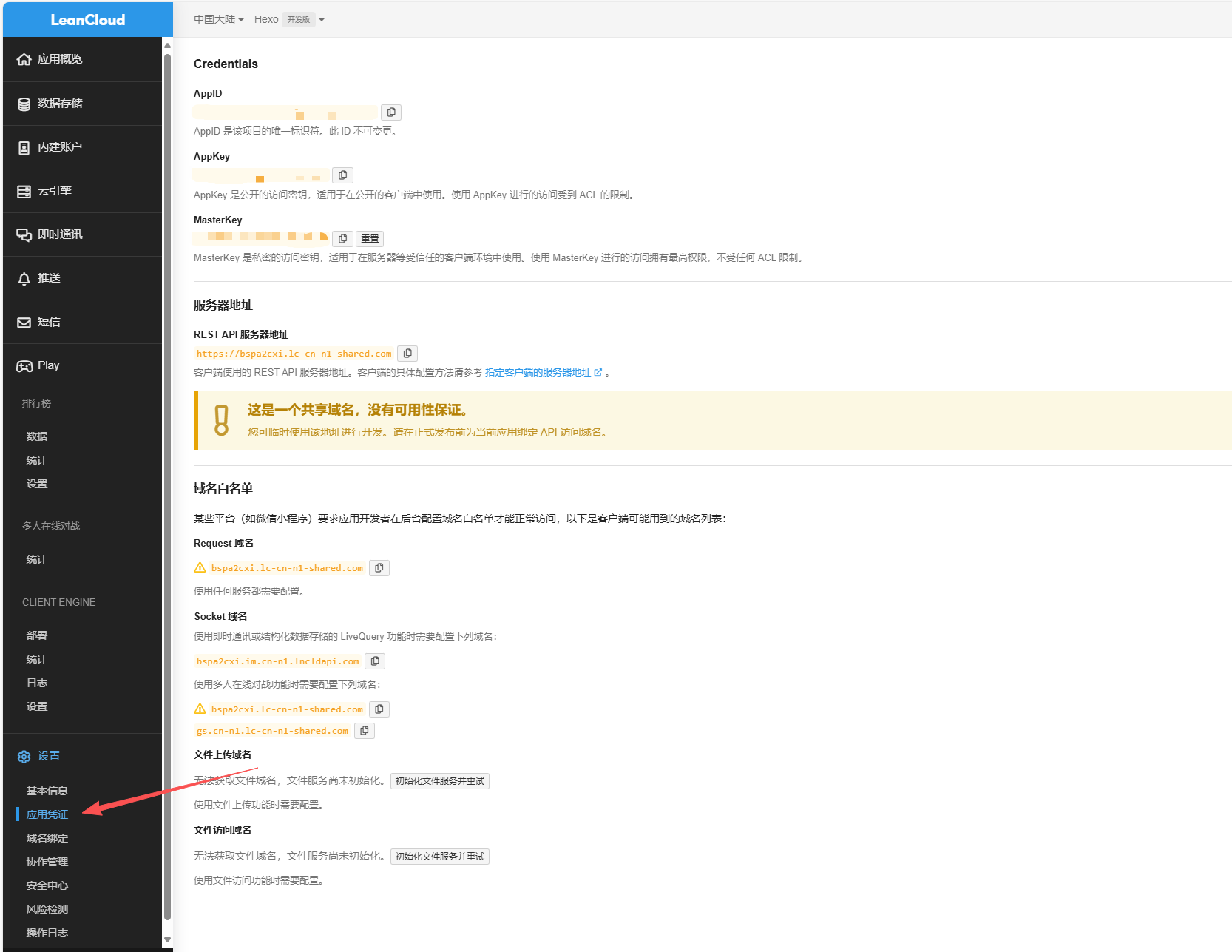
img1

4 在 Hexo 博客主题配置文件 next/_config.yml 中进行配置 AppID 和 AppKey,这里整段复制在合适的地方即可,8.2以上的Next本身就没有”valine:”。

1
2
3
4
5
6
7
8
9
10
11
12
13
14
15
16
17
# Valine
# For more information: https://valine.js.org, https://github.com/xCss/Valine
valine:
enable: true
appId: xxxxxxxxxxxxxxxxxxxx # leancloud application app id
appKey: xxxxxxxxxxxxxxxxxxxx # leancloud application app key
serverURLs: "https://bspa2cxi.lc-cn-n1-shared.com" # When the custom domain name is enabled, fill it in here
placeholder: Just go go # comment box placeholder
avatar: mm # gravatar style
meta: [nick, mail, link] # Custom comment header
pageSize: 10 # pagination size
visitor: false # leancloud-counter-security is not supported for now. When visitor is set to be true, appid and appkey are recommended to be the same as leancloud_visitors' for counter compatibility. Article reading statistic https://valine.js.org/visitor.html
comment_count: true # If false, comment count will only be displayed in post page, not in home page
recordIP: false # Whether to record the commenter IP
enableQQ: false # Whether to enable the Nickname box to automatically get QQ Nickname and QQ Avatar
requiredFields: [] # Set required fields: [nick] | [nick, mail]
libUrl: https://cdnjs.cloudflare.com/ajax/libs/valine/1.5.3/Valine.min.js # Valine.min.js file URL in CDN (or local path)

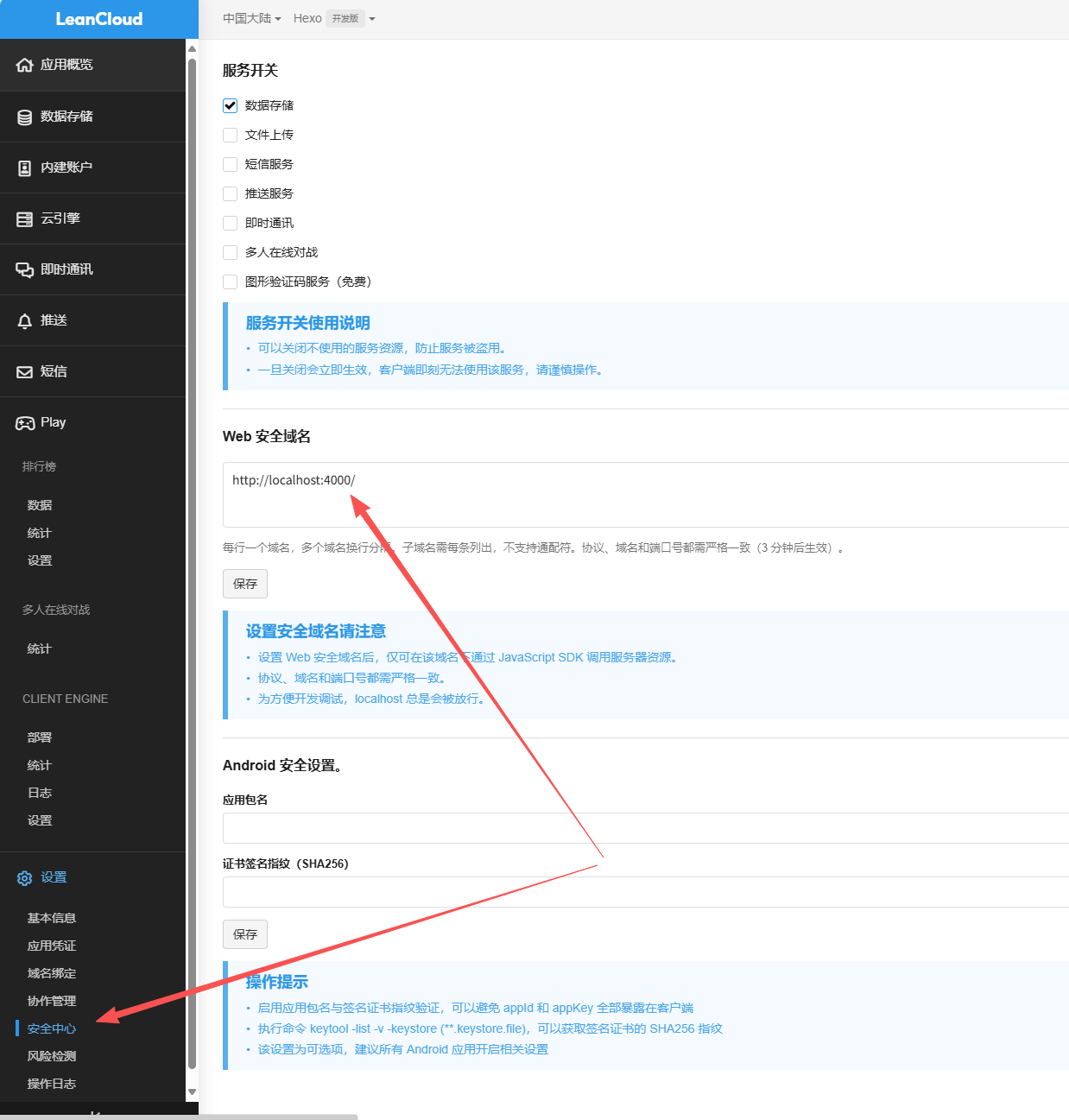
5 在LeanCloud给自己的域名设置白名单
img2

最终

1
hexo cl; hexo g; hexo s

进入页面后进行测试

补充

配置Valine后例如“标签”,“分类”等子页面也会出现评论界面,这显然是不合理的。
在 根目录/source/categories (或tags等等,取决于你有多少个),下的index.md中修改如下:

1
2
3
4
5
6
---
title: categories
date: 2025-10-10 08:39:59
type: "categories"
comments: false
---

这样这些无关页面就没有评论栏了